


This week, we're rolling out a new update to the Fast-Weigh Web Portal with some key improvements to your Billing and AR experience.
Billing & AR Balance Dashboard Enhancements
- Balance Due amounts on the Balance Dashboard have been modified to reflect values based on the number of Overdue Days instead of Days Since Invoice.
- Previously, the 1-30 Days column included Current (not overdue) invoices.
- Now, Current reflects all invoices that are not overdue, while 1-30 Days includes only invoices 1-30 days overdue, and so on.
- Previously, the 1-30 Days column included Current (not overdue) invoices.
- Added two new columns: Credit Balance and Overdue Invoice Balance, along with a Totals row at the bottom of the table.
- Added filter funnels for quick and easy column filtering.
- Note: Filters only update the information within the table and do not affect the cards above it.
- Added a new Export to Excel feature to the Balance Dashboard grid.
- Currently only supports summary data exports.
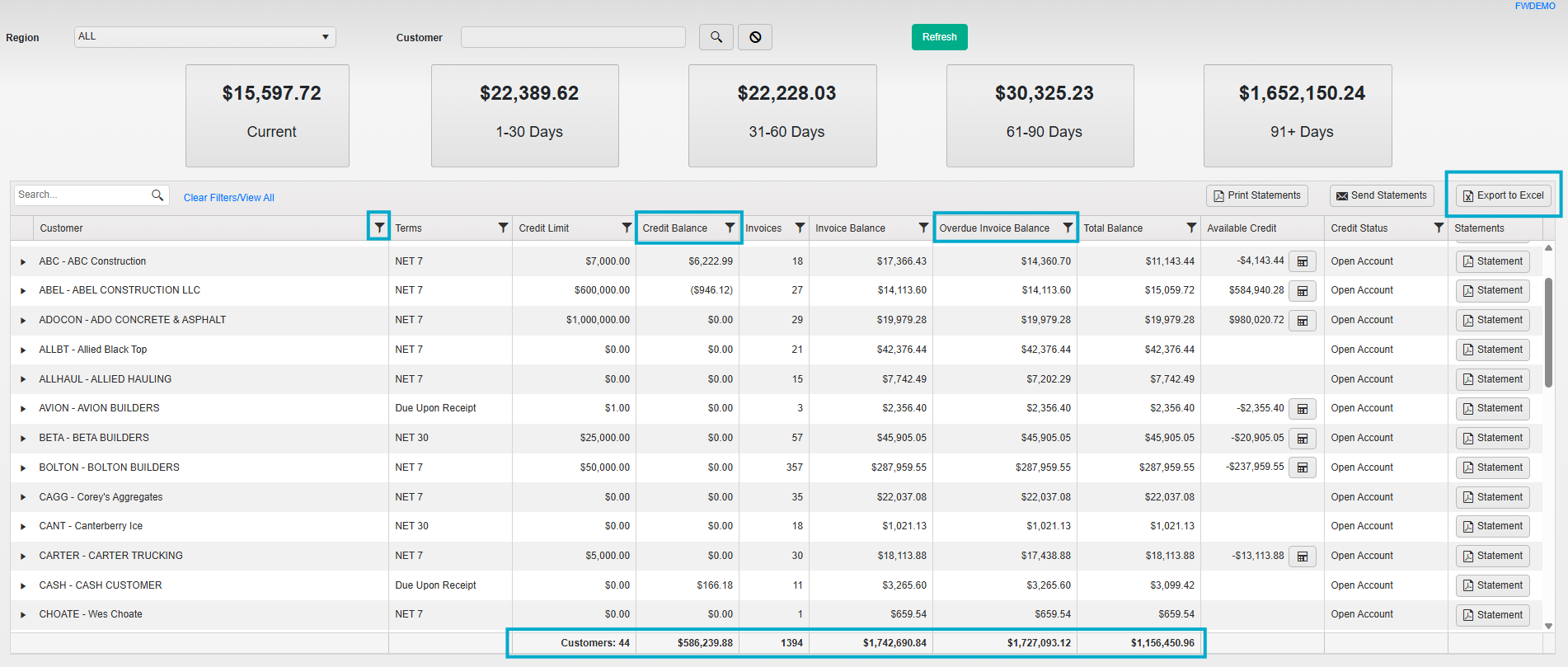
- The Total Balance column now replaces Balance Due and reflects credits subtracted from outstanding invoices.
- You can now make payments directly from the Balance Dashboard by expanding the detail arrow next to a customer, selecting an individual invoice, and using the $Pay button.
- You can also select More to settle or credit an invoice directly.

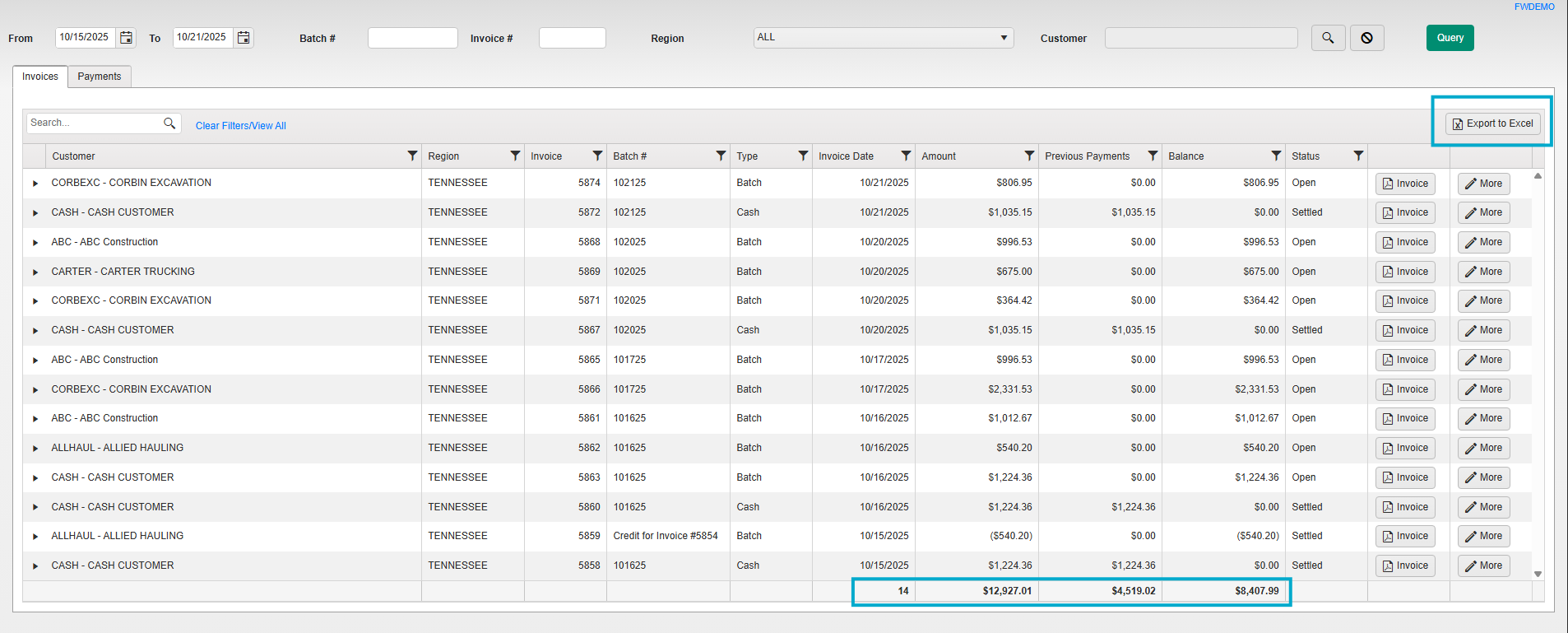
- We have added Totals rows to the Invoices and Payments tabs on the Invoice/Payments Query page as well.
- Added a new Export to Excel feature to the Invoice & Payments grids.
- Currently only supports summary data exports.
Reporting Update
- The AR Aging Summary and AR Aging Detail reports have been updated to match the new Balance Dashboard amounts, providing clearer reconciliation of customer balances.
- Note: If a customer has no open invoices but has a credit balance, it will display on Aging reports but not on the Balance Dashboard.
- Additionally, we have removed the Historical Aging Summary and Historical Aging Detail reports to eliminate redundancy. If you still need access to these, our Support team can provide them as custom reports upon request.
- Note: If a customer has no open invoices but has a credit balance, it will display on Aging reports but not on the Balance Dashboard.
Web Portal Dashboard Update
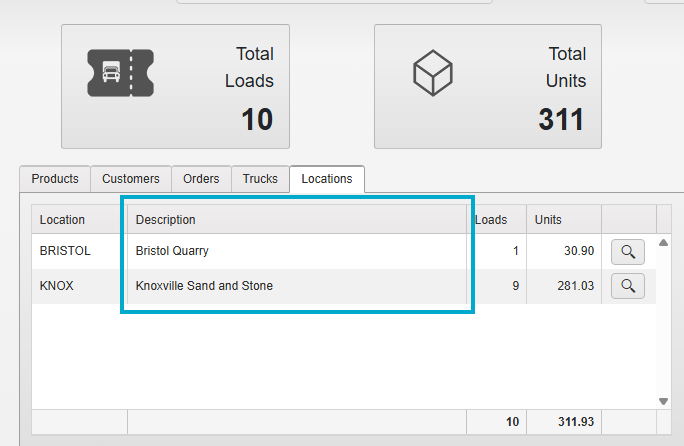
- The Locations tab now includes a Location Description column for easier identification.
______________
If you have questions about this update, please give us a call at 865-219-2980 or send us an email at support@tacinsight.com. Additional information on all of our products can also be found on our website. – www.tacinsight.com

Related Posts
This week, we're rolling out a new update to the Fast-Weigh Web Portal with some key improvements to your Billing and AR experience.
Billing & AR Balance Dashboard Enhancements
- Balance Due amounts on the Balance Dashboard have been modified to reflect values based on the number of Overdue Days instead of Days Since Invoice.
- Previously, the 1-30 Days column included Current (not overdue) invoices.
- Now, Current reflects all invoices that are not overdue, while 1-30 Days includes only invoices 1-30 days overdue, and so on.
- Previously, the 1-30 Days column included Current (not overdue) invoices.
- Added two new columns: Credit Balance and Overdue Invoice Balance, along with a Totals row at the bottom of the table.
- Added filter funnels for quick and easy column filtering.
- Note: Filters only update the information within the table and do not affect the cards above it.
- Added a new Export to Excel feature to the Balance Dashboard grid.
- Currently only supports summary data exports.
- The Total Balance column now replaces Balance Due and reflects credits subtracted from outstanding invoices.
- You can now make payments directly from the Balance Dashboard by expanding the detail arrow next to a customer, selecting an individual invoice, and using the $Pay button.
- You can also select More to settle or credit an invoice directly.
- We have added Totals rows to the Invoices and Payments tabs on the Invoice/Payments Query page as well.
- Added a new Export to Excel feature to the Invoice & Payments grids.
- Currently only supports summary data exports.
Reporting Update
- The AR Aging Summary and AR Aging Detail reports have been updated to match the new Balance Dashboard amounts, providing clearer reconciliation of customer balances.
- Note: If a customer has no open invoices but has a credit balance, it will display on Aging reports but not on the Balance Dashboard.
- Additionally, we have removed the Historical Aging Summary and Historical Aging Detail reports to eliminate redundancy. If you still need access to these, our Support team can provide them as custom reports upon request.
- Note: If a customer has no open invoices but has a credit balance, it will display on Aging reports but not on the Balance Dashboard.
Web Portal Dashboard Update
- The Locations tab now includes a Location Description column for easier identification.
______________
If you have questions about this update, please give us a call at 865-219-2980 or send us an email at support@tacinsight.com. Additional information on all of our products can also be found on our website. – www.tacinsight.com


